
Help Centre
<
HomeThe Meta Ads integration within the Salesfire dashboard will allow you to feed valuable first-party data collected through the Salesfire Segments and sync this into your Meta Audiences, enabling you to further refine targeting for your paid marketing to optimise and refine ad spend.
This integration streamlines ad targeting, reduces manual work, and opens new opportunities for you to maximise ROI by aligning your campaigns and syncing data from the Salesfire segments and lists to your Meta Audiences.
The ability to sync Segments and Lists with Meta Ads allows users to leverage collected data to create lookalike audiences within Meta by identifying individuals with similar characteristics to existing customers who have made purchases. Target a broader audience with a higher likelihood of converting.
How to connect your Segments & Lists to Meta Ads
- In your Salesfire dashboard, select Settings and then choose Integrations from the menu options to manage any of your integrations.
- Select the Setup option for Meta Ads.
Getting Started
Begin by connecting your Meta Ads account, once completed choose the business account you wish to connect the segments and lists to.
Sync Salesfire Audiences with Meta Audiences
Choose which Segments and Lists sync to your Meta Ads Audiences. This process involves mapping our audiences to your audiences within Meta Ads.
Connect your Segment
Once you have selected your Meta Ads account, you can now begin to add your Segment and sync this with your chosen Meta Ads audience.
Multiple connections can be added following the onscreen steps if you wish to sync multiple segments with your Meta Ads audiences.
Consent agreement
Before completing the syncing process, you must follow the EEA/UK Compliance section to ensure that full consent policies are met.
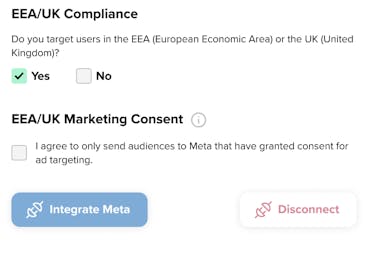
Once you have completed the steps, you must select Integrate Meta.
A completion message will appear to confirm the connection has been successful.
This successful connection will ensure that any continuous data added to your Segments or imported into Lists within the Salesfire Audiences section is synced with the audience you have created for your Meta Ads account.
If you currently do not have a segment setup, you can find tips here before you get started with Meta Ads syncing.